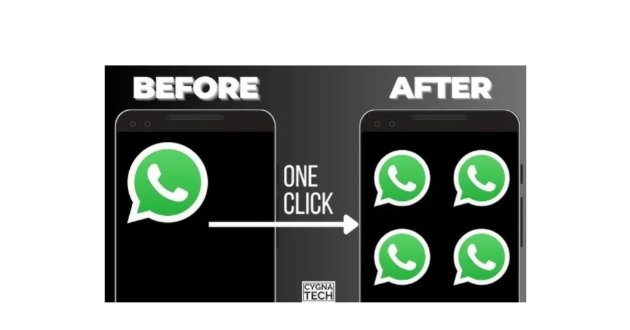
Introduction, Use Four WhatsApp Accounts on One Phone.
Many people today use more than one WhatsApp account. One number may be used for family and friends, another for business, another for customers, and another for a separate personal or professional purpose. Carrying four different smartphones just to manage four WhatsApp accounts can be inconvenient.This is where app-cloning and MultiSpace applications can be useful. These applications create separate app environments on the same Android phone, allowing compatible applications to be installed or duplicated inside those environments. With the right setup, users may be able to manage several WhatsApp accounts from one device.
However, there is an important distinction between official WhatsApp multi-account support and third-party cloning applications. WhatsApp officially supports multiple accounts on one phone, but the built-in feature is designed around two accounts rather than four. Meta announced the multiple-account feature for Android and explained that users can keep two WhatsApp accounts logged in simultaneously, with a second phone number and SIM or eSIM required.
For users who specifically want four separate WhatsApp installations, a MultiSpace or app-cloning solution may provide additional possibilities on compatible Android devices. This article explains how these applications work, what options are available, how to install them, and what security precautions you should take.
What Is MultiSpace APK.
MultiSpace APK generally refers to an Android application package that creates a separate environment where another copy of an application can run. Instead of modifying the original WhatsApp installation, a cloning application creates a parallel environment and runs another instance inside it.
The concept is simple. Your normal WhatsApp remains installed on the phone. The cloning application then creates another space, where another supported application can be installed. Additional spaces may allow additional accounts, depending on the particular application, Android version, device, and premium limitations.
One current Google Play example is Parallel App – Dual App Cloner, which advertises multiple instances of social and gaming applications and specifically lists WhatsApp among its supported applications.
Another option is Multiple Accounts: Dual Space, which advertises cloning of social, messaging, and gaming applications and specifically mentions multiple WhatsApp accounts.
Four WhatsApp Apps, Is It Really Possible.
The answer is, potentially yes on compatible Android phones, but it depends on the method you use.
There are several ways to manage multiple WhatsApp accounts.
The first method is WhatsApp’s own built-in account feature. This is the safest and most official method, but it is intended for two accounts.
The second method is the phone manufacturer’s built-in app-cloning feature. Some Android manufacturers offer features such as Dual Messenger, Dual Apps, App Clone, Twin Apps, or similar functions.
The third method is a third-party cloning application such as Parallel App or Multiple Accounts.
The fourth method is using separate Android user profiles where the device supports them. Android’s official documentation explains that different user profiles have separate spaces for apps, accounts, settings, and home screens.
For four WhatsApp accounts, the exact combination depends on your phone.
Method One, Official WhatsApp Multiple Accounts.
- Before installing any MultiSpace APK, check whether WhatsApp’s built-in multiple-account feature already solves your problem.
- WhatsApp officially supports two accounts on one phone. Meta explains that users can add a second account and switch between accounts without logging out. A separate phone number is required for the second account.
- The setup is straightforward.
- Open WhatsApp and go to Settings. Tap the arrow next to your profile name. Select Add account and follow the instructions.
- You will need another phone number for the second WhatsApp account.
- This method has a major advantage because you are using the official WhatsApp application rather than a modified WhatsApp APK.
- Meta also specifically advises users to use the official WhatsApp and avoid imitation or fake versions.
Method Two, Use Your Phone’s Built-In App Cloner.
- Before downloading a third-party MultiSpace APK, check whether your Android phone already has an app-cloning feature.
- Different manufacturers use different names for this feature.
- Samsung commonly calls its feature Dual Messenger. Other Android manufacturers may use names such as Dual Apps, App Clone, Twin Apps, or Clone Apps.
- If your phone supports WhatsApp cloning, you may be able to create another WhatsApp installation without downloading a third-party cloning application.
- This is generally preferable because the feature is integrated into the operating system.
- The exact steps vary by manufacturer and Android version. Open Settings and search for terms such as:
- Dual Messenger.
- Dual Apps.
- App Clone.
- Clone Apps.
Twin Apps: If the feature is available, enable WhatsApp and follow the on-screen instructions.
Method Three, Parallel App MultiSpace.
Parallel App is one of the currently available Android cloning applications. Its Google Play listing says it can run multiple instances of supported social and gaming applications and specifically lists WhatsApp and WhatsApp 2 among supported applications.
The application is listed on Google Play, which makes the official store version preferable to an unknown APK downloaded from a random website.
The basic concept is to install the cloning application, open it, select WhatsApp, and create a separate WhatsApp environment.
The number of accounts you can actually run may depend on the application’s current free and premium limits. The Google Play listing says the free version supports dual accounts and that VIP features provide unlimited accounts and an ad-free experience.
Therefore, users should not assume that downloading an APK automatically means four unlimited WhatsApp installations are guaranteed.
Method Four, Multiple Accounts, Dual Space.
- Another application in this category is Multiple Accounts: Dual Space.
- Its current listing describes the ability to clone popular social, messaging, and gaming applications and specifically mentions multiple WhatsApp accounts.
- The application can create separate environments for supported applications, allowing users to keep accounts separated.
- However, users should check the current version and compatibility before relying on it for four WhatsApp accounts. Application-cloning technology can be affected by Android security restrictions, WhatsApp updates, and device compatibility.
How to Install MultiSpace APK.
- If you choose a third-party cloning application, the safest approach is to obtain it from an official app store whenever possible.
- Open Google Play Store.
- Search for a reputable app-cloning application.
- Check the developer name.
- Read the reviews.
- Check the download count.
- Review the application’s permissions and data-safety information.
- Then install the application.
- Avoid downloading a “MOD APK” simply because it promises unlimited WhatsApp accounts.
- A modified APK can potentially contain altered code, unwanted advertisements, trackers, or malicious components.
How to Add WhatsApp Inside MultiSpace.
- After installing a compatible cloning application, open it.
- The application should display supported applications. Look for WhatsApp.
- Tap WhatsApp and allow the application to create a cloned environment if requested.
- A second WhatsApp icon may then appear inside the cloning application.
- Open the cloned WhatsApp.
- Enter the phone number associated with your second account.
- Complete the verification process.
- Once verified, you can use the second WhatsApp account separately from your main WhatsApp.
- To create additional accounts, the cloning application’s interface may provide an option to add another instance or another space.
- However, whether you can create a third or fourth WhatsApp instance depends on the particular cloning application’s current limitations.
How to Use Four WhatsApp Accounts.
Suppose you have four phone numbers.
You could organize them like this.
WhatsApp 1, Personal Account: Your main WhatsApp installation can be used for family, friends, and personal conversations.
WhatsApp 2, Business Account: The second account can be dedicated to customers and business contacts.
WhatsApp 3, Work Account: A third account can be used for workplace communication or another professional number.
WhatsApp 4, Separate Account: A fourth account can be reserved for another legitimate purpose, such as a separate project, organization, or additional business line. Each WhatsApp account requires its own phone number for registration. Do not attempt to register accounts using numbers that you do not own or control.
Best MultiSpace Apps for WhatsApp.
There is no single cloning application that is guaranteed to be the best for every Android phone.
Parallel App, Dual App Cloner: Parallel App is available through Google Play and specifically advertises support for WhatsApp and multiple instances of applications. It also provides features such as private passcode protection and separate app spaces. It is a reasonable option for users who want a mainstream cloning solution.
Multiple Accounts, Dual Space: Multiple Accounts focuses on running separate instances of applications and supports popular messaging and social applications, including WhatsApp. It may be useful for users who need separate environments for different accounts.
Built-In Dual Apps: If your smartphone includes a built-in cloning feature, this may be the better choice because you do not need to install an additional virtualization application. Check your phone’s Settings before installing anything.
Why Four WhatsApp Accounts Can Be Useful.
Running multiple WhatsApp accounts on one phone can make communication much easier.
A business owner can separate customer conversations from personal chats.
A freelancer can keep different clients organized.
A content creator can maintain separate numbers for different projects.
A person with multiple legitimate phone numbers can avoid carrying several phones.
The biggest advantage is convenience.
Instead of carrying four smartphones, you can potentially manage multiple accounts from one Android device.
Notifications From Multiple WhatsApp Accounts.
- One challenge with multiple WhatsApp installations is notifications.
- If you have four active accounts, you may receive notifications from all four at the same time.
- This can become confusing.
- A good solution is to use different notification sounds for different accounts when the application and Android system allow it.
- You can also use notification categories to control which alerts appear.
- For example, your business WhatsApp could have a different notification sound from your personal WhatsApp.
- This makes it easier to know which account received a message without opening the application.
Storage Requirements.
- Four WhatsApp environments can require significantly more storage than one WhatsApp installation.
- Every account can accumulate photographs, videos, documents, voice messages, stickers, and other media.
- If you use multiple accounts for a long period, storage usage can become substantial.
- You should regularly review WhatsApp storage and remove unnecessary large files.
- Meta introduced improved storage-management features that allow users to manage large files within individual chats without deleting the entire conversation.
- Using four accounts therefore requires more attention to storage management.
Battery Consumption.
- Multiple active WhatsApp environments can also increase battery usage.
- Each application instance may need to process notifications, synchronize messages, download media, and perform background tasks.
- A third-party cloning application may also consume additional resources because it creates a separate environment for the cloned application.
- If battery consumption becomes excessive, review Android’s battery settings and background activity for the cloning application.
- You should also avoid cloning applications that you do not actually need.
RAM and Performance.
Four WhatsApp instances can consume more RAM than a single installation.
Phones with larger RAM capacities generally handle multitasking more comfortably, but the exact experience varies by Android version, chipset, storage speed, and background restrictions.
If your phone has limited RAM, four active WhatsApp accounts may result in applications being reloaded more frequently.
For the best experience, keep Android updated and maintain sufficient free storage.
Is MultiSpace APK Safe.
The safety of a MultiSpace APK depends heavily on where it comes from.
An official app-store version from a known developer is generally preferable to an APK from an unknown website.
This is especially important for applications that can access or create environments containing messaging applications.
WhatsApp itself recommends using official WhatsApp rather than imitation or fake versions.
Therefore, avoid unofficial modified versions of WhatsApp such as random “premium,” “anti-ban,” “GB,” or “unlimited” APKs.
A third-party cloning application is different from a modified WhatsApp application, but it still needs to be selected carefully.
Avoid Fake MultiSpace APK Websites.
Many APK websites use attractive titles such as:
- Four WhatsApp in One Phone.
- Unlimited WhatsApp Accounts.
- WhatsApp 4 Clone APK.
- MultiSpace Premium APK.
MultiSpace Pro Unlocked: These titles do not prove that the file is safe or official. Before installing an APK, verify the developer and source. If the website asks you to install another unknown application before downloading MultiSpace, be cautious. If the APK requests unusual permissions unrelated to its functionality, reconsider the installation. If your browser or Android security system warns that the file may be dangerous, do not ignore the warning without understanding why it appeared.
Official WhatsApp vs Cloned WhatsApp.
There is an important difference between using multiple accounts within official WhatsApp and running cloned instances.
Official WhatsApp is developed and distributed by WhatsApp and receives direct updates.
A cloning application creates another environment in which an official WhatsApp installation may run.
The cloning application itself is not WhatsApp.
Therefore, if you see an application claiming to be “WhatsApp 4,” “WhatsApp 5,” or “Unlimited WhatsApp,” verify whether it is actually WhatsApp or merely a third-party cloning tool.
WhatsApp Security and Privacy.
WhatsApp states that personal messages and calls remain protected by end-to-end encryption. Meta also explains that adding WhatsApp to Accounts Center does not change this encryption.
However, users should understand that third-party applications surrounding WhatsApp can introduce additional privacy considerations.
For example, a cloning application may request access to notifications, storage, or other Android features depending on how it works.
Only grant permissions that are necessary.
Use a screen lock on your phone.
Enable WhatsApp’s available security features.
Do not share verification codes.
Never give your WhatsApp registration code to another person.
Can You Use Four WhatsApp Accounts Without Root.
In many cases, third-party cloning applications are designed to work without root access.
Parallel App, for example, promotes multi-account functionality without requiring root.
This is useful because rooting a smartphone can introduce additional security and stability risks and is unnecessary for ordinary multi-account WhatsApp use.
If a website tells you that you must root your phone to run four WhatsApp accounts, do not immediately follow that advice.
First check whether your device already supports app cloning or multiple users.
Android Multiple Users as an Alternative.
- Android also supports multiple user profiles on compatible devices.
- Google explains that each user profile can have its own apps, accounts, settings, and personal space.
- This can provide another way of separating applications and accounts, although switching between users is less convenient than having four WhatsApp icons on the same home screen.
- Not every Android phone provides the same multiple-user functionality.
- You can check Settings and search for Multiple users.
iPhone Users, Important Difference.
The MultiSpace APK concept is primarily relevant to Android because APK files are Android application packages.
iPhone does not install APK files.
WhatsApp has nevertheless expanded its own multiple-account support on iOS. Meta announced in March 2026 that two WhatsApp accounts can now be logged in at the same time on iOS, similar to Android.
Therefore, iPhone users should not download Android APK files or attempt to install them on iOS.
Troubleshooting Four WhatsApp Accounts.
If the fourth account does not work, the problem may be caused by the cloning application’s account limit.
Check whether the free version supports more than two accounts.
If the application requires a premium subscription for additional instances, review its current pricing.
If WhatsApp crashes inside the cloned environment, update both WhatsApp and the cloning application.
If notifications do not arrive, check Android notification permissions and battery restrictions.
If verification fails, confirm that the phone number is active and able to receive the required verification method.
Do not repeatedly request verification codes unnecessarily.
Best Setup for Four WhatsApp Accounts.
For the most stable configuration, start with the official WhatsApp application.
Then check whether your smartphone provides a built-in WhatsApp cloning feature.
If you still need additional accounts, consider a reputable cloning application available through Google Play.
Avoid modified WhatsApp APKs.
Keep each phone number separate.
Use different profile pictures or names so you can easily identify each account.
Manage notifications carefully.
Monitor storage and battery usage.
This approach provides a much safer and more organized multi-account setup.
Final Verdict, Best MultiSpace APK for Four WhatsApp Accounts.
If your goal is to run four WhatsApp accounts on one Android phone, there are several possible solutions.
For two accounts, WhatsApp’s official multiple-account feature is the best and safest choice. Meta officially supports two accounts on one phone and requires a separate phone number for the additional account.
For additional accounts, a phone’s built-in Dual Messenger, Dual Apps, App Clone, or Twin Apps feature can be preferable when available.
For users who specifically need a third-party cloning solution, Parallel App and Multiple Accounts: Dual Space are examples of applications that currently advertise WhatsApp cloning and multiple-account functionality.
However, whether four WhatsApp instances work simultaneously depends on your Android phone, WhatsApp version, cloning application’s limitations, and available RAM and storage.
Most importantly, avoid unofficial modified WhatsApp APKs. Meta explicitly recommends using the official WhatsApp application rather than imitation or fake versions.
In short, four WhatsApp accounts on one Android phone may be possible, but the safest strategy is to use official WhatsApp features first, then your phone’s built-in cloning feature, and only then a reputable third-party MultiSpace application when necessary.



